
Free grocery budget tracker template for Excel and Google Sheets
This free grocery budget tracker template is one Excel file (.xlsx) that also opens in Google Sheets and LibreOffice and gives the same totals in each. You enter expenses one per row and pick a group from a list. The “Budget” sheet adds up every group for every month and shows what is left of your budget and the balance of income and spending. Groceries are the first group, and the other eight cover bills, transport, health and the rest of the household. The columns match the export of the Traty app, so scanned receipts paste in without retyping. The export is part of the Traty subscription; the template itself is free.
Download the grocery budget templateXLSX · 163 KB
No sign-up and no email address. You may copy, change and share the file.
What is in the grocery budget template?
| Sheet | What it holds |
|---|---|
| Budget | every group's total for each month of the year, total spent, income, balance and what is left of the budget |
| Expenses | one expense per row: date, store, item, quantity, price, line total, category and group |
| Categories | 31 categories and 9 groups that feed the drop-down lists |
| How to use | how to start in five steps |
There are nine groups: Groceries, Bills & services, Home & electronics, Transport, Health, Clothing & shoes, Personal care, Kids & education, Free time. Discounts and any expense without a group go to the Other & discounts row, so every expense dated in a month is counted in that month’s total.
How do you use the budget template?
- Download the file and open it in Excel or LibreOffice.
- On the Budget sheet, enter the year and your monthly budget. The cells to fill in are yellow.
- Delete the example rows on the Expenses sheet.
- Add your expenses. A date, the amount in the Line total column and a group from the list are enough. Fill in the other columns if you want more detail.
- Enter income in the yellow Income row. The balance and “Left in budget” are calculated automatically, and a negative amount turns red.
How do you open the template in Google Sheets?
Upload the file to Google Drive and double-click it: it opens in Google Sheets. The template uses only basic functions that Google Sheets has too.
What does a month look like in the template?
The file comes with example expenses from October: a grocery receipt from Lidl, a fill-up and the rent. This is how the Budget sheet adds them up with a budget of €1,500:
| Row | October |
|---|---|
| Groceries | €3.97 |
| Bills & services | €950.00 |
| Home & electronics | €11.66 |
| Transport | €68.80 |
| Other & discounts | -€0.50 |
| Total spent | €1,033.93 |
| Left in budget | €466.07 |
The Lidl receipt takes five rows here: milk and bread go to “Groceries”, laundry detergent and cat food to “Home & electronics”, and the discount to “Other & discounts”. On your bank statement the same receipt is one payment of €15.13 to a supermarket. That is why a grocery budget kept line by line tells you more than a bank statement: the cat food and the detergent stop hiding inside the food budget.
Where do the rows come from without retyping receipts?
Typing in every line of a receipt gets old fast, and that is why many budget spreadsheets die after a few weeks. A phone can do that part:
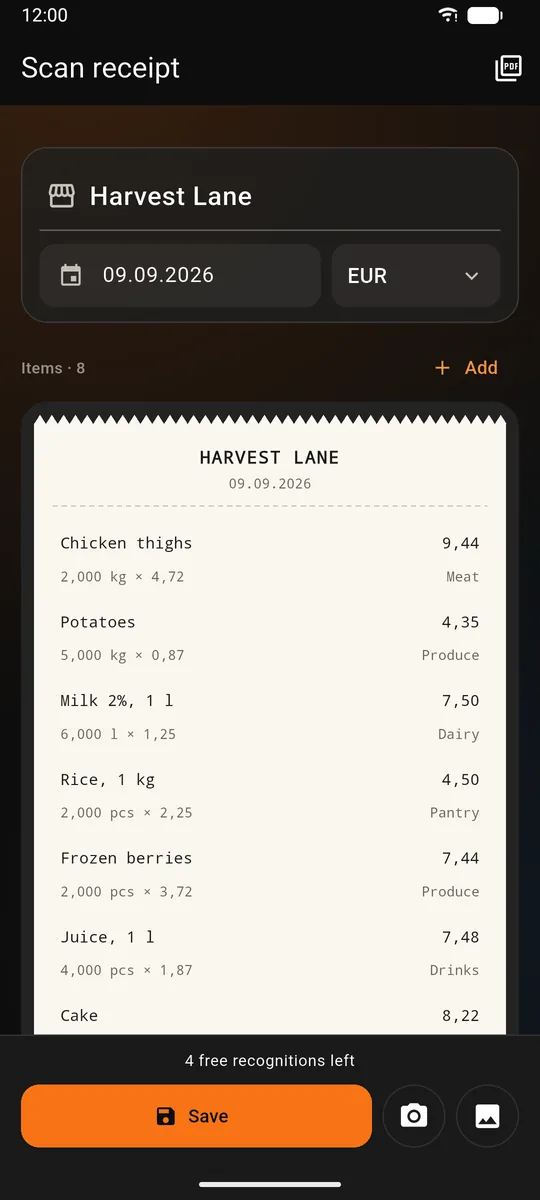
- In Traty you take a photo of the receipt. The app lists the items and gives each one a category and a group.
- You choose Settings → Export to spreadsheet and a period.
- You open the export file, copy the rows without the header and paste them into the first empty row of the Expenses sheet (the first time, from cell A2). Export a new period each time, for example last month, so rows are not repeated.
The export has the same columns in the same order, and when the app is in English, the group names match the template.
Questions
Is the template really free?
Yes. You download the file with no sign-up and no email address. You may copy, change and share it. The export from the Traty app is part of the subscription, but the template works without the app.
Does the template work in Google Sheets and LibreOffice?
Yes. The file is in Excel format (.xlsx), and the formulas are plain conditional sums that work in all three programs.
Why doesn’t an expense show up in any month?
Most often the Date column holds text instead of a date. Type the date again, for example 2026-10-03. Also check that the year on the Budget sheet matches the year of the expenses. The same happens with an amount saved as text: 12,50 where the sheet expects 12.50, or the other way round, 12.50 where it expects 12,50. Which one it expects depends on the language and region settings of your Excel or Google Sheets. Text is usually aligned to the left and a number to the right. Type the amount again or swap the commas and dots.
Can I rename the groups?
Yes. Change the name in the “Groups” column of the Categories sheet and in the first column of the Budget sheet. Both names must be identical, because the template adds up expenses by them. In expenses you have already entered, replace the old name in the Group column as well.
What about expenses in several currencies?
One file is one currency. The template does not convert rates, so expenses in another currency are best kept in a separate copy of the file.